After getting yeoman installed and creating the first project it is easy to add controllers to the project. Adding controllers is done by running the yo angular:controller newCtrl command in the terminal. (The new controller will be named 'new.js', the 'Ctrl' portion remains in the code, but all the files will be shortened to just 'new.js'.) This creates two files. the first file is the controller and it is located in app/scripts/controller. The second file is the unit test and it is located at test/spec/controllers.
Challenging the status quo and empowering engineers
My demo angularjs app has gained traction, so its time to turn it into a real project. The best fit for me is to move the angular app into Yeoman. Yeoman is a tool for automating workflows in web app development. Yeoman combines scaffolding, testing, and deployment into one tool. The scaffolding is done using Yo. The testing and deployment is done with Grunt. Dependencies are managed by Bower.

Creating minified angularjs scripts requires an extra step to make sure all the dependancies are injected properly. The basic workflow is to concatenate all the angular scripts into one file, use ngmin to rewrite the script with the proper angular injections/syntax, then use Closure Compiler to minify the concatenated and altered angularjs script.
This week I found out how easy it is to spin up a Hadoop cluster with Amazon AWS. My fist app was the simple word count app found on the AWS tutorial site. The biggest thing missing from the tutorial is an interesting data set. (The tutorial uses a 3 line text file.) After the Word Count Hadoop tutorial the next most popular tutorial is calculating Twitter sentiment. For this I needed to become familiar with Twitter's API, specifically the Streaming API.
Using HTTPS with express is almost as simple as replacing require('http') with require('https'). For my application I am using a self-signed certificate that I created after following the directions on Nate Good's blog. I placed the certs in a folder called cert.
My application uses node.js and socket.io for communication between server and client. For communication between server and local hardware/programs I need a way to pass events and variables from node.js to python. The solution I am using is to store the values in Redis and access them from both node.js and python. First Redis needs to be installed; on Ubuntu simply run
Now that I have a working HMI setup with user authentication, I want to extend it to include remote devices and computers. The easiest way to connect remote computers is to emulate the browser connection. Since malicious hackers will probably attempt to do this anyway it is also a great way to test the security and robustness of the system. My example is taken directly from the creator of Passport.SocketIO, José F.
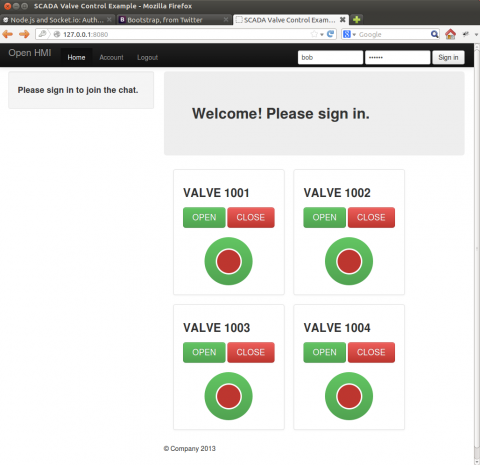
Authenticating socket.io with passport is tricky because socket.io doesn't have direct access to the cookie data that passport.js and express create. The solution is to add a socket.io function that requests the cookie and checks it against the list created by passport. Fortunately jfromaniello on github has already created passport.socketio.
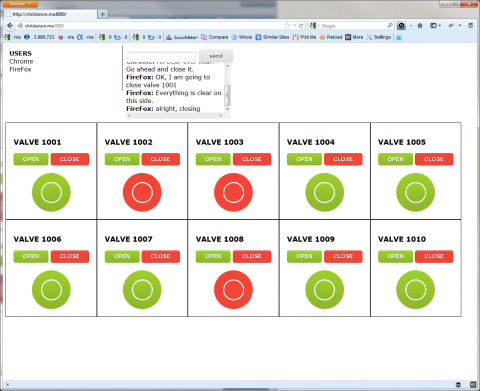
Using node.js, socket.io, and express I created a simple real-time HMI for controlling valves. This method can be used to control any device including a network connected arduino or raspberry pi, local USB connected IO boards, or any other device that can communicate with web sockets. In this simple web based HMI clients connect and enter their name. Clients are then allowed to send and receive chat messages or press the open and close buttons associated with each valve. Security and access restrictions were not used here, but could be added later.