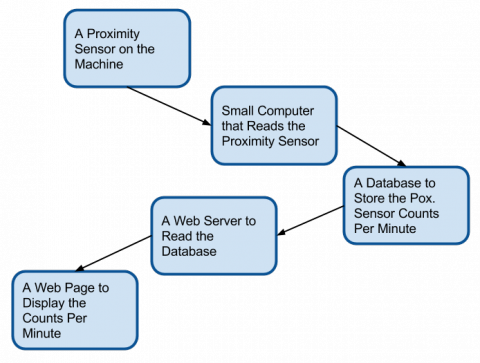
The power of LabVIEW Web Services is in the Web Resources. A Web Resource is a URL that returns data from a LabVIEW VI. By combining a static HTML page with JavaScript we can create truly dynamic webpages that are powered by LabVIEW.

In this tutorial I will demonstrate how to create a Web Resource that returns the current value of a Vertical Slider.

Start with a blank project. Add a new VI with a single Vertical Slider on the front panel and wire the slider to a Global Variable on the back panel.
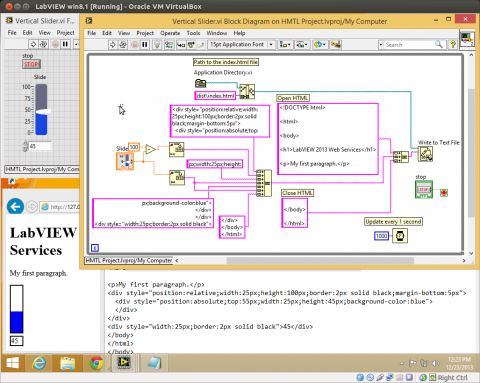
One of the core design principles of the web is to separate date from presentation. Every webpage has at least HTML and CSS. The HTML defines the data and the CSS defines the presentation. In the case where the CSS is not explicitly defined the default styles of the web browser are used.

By manipulating the HTML and CSS it is possible to recreate most of the LabVIEW front panel controls. In this example I will show you how to recreate a crude, but functional, Vertical Progress Bar. The same techniques can be used to recreate most of the front panel controls.

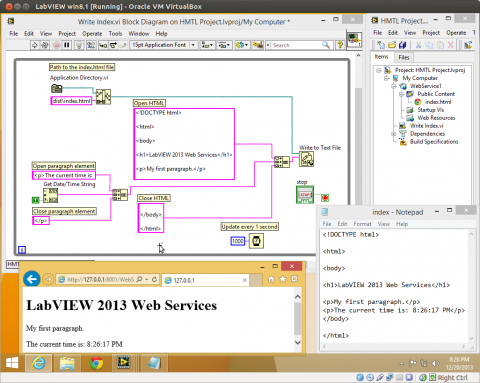
The static html page can be updated while the LabVIEW 2013 Web Service is running. This allows for the files to be dynamically updated by a running VI. Then whenever the web page is refreshed in the web browser, new data will be displayed.

This example shows how to update an HTML file in the Public Content folder of a running LabVIEW 2013 Web Service. (Read the static html page example to learn the basics before trying this example.)

LabVIEW Web Services received a great update for 2013. Web Services are now easier to use and run in the same context as the other VIs in a LabVIEW project. Remote front panels can now be created that can be accessed from any mobile device with a web browser.

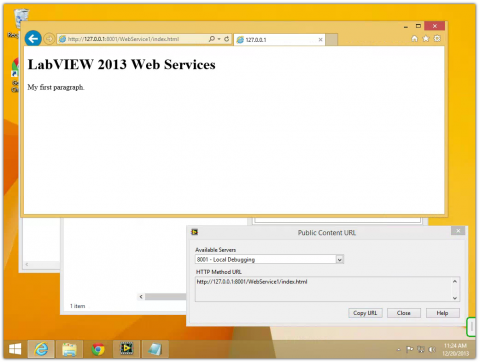
This is a very simple tutorial showing how to serve static html webpages with the LabVIEW 2013 Web Service. The next example shows how to dynamically update a webpage.

The biggest hurdle for me when getting started with a new technology is setting up my workspace with all the tools I'll need. For basic web development there are two tools, a web browser and a text editor. Obviously the browser choice is whichever one my customer will be using. The text editor choice is complex. There are dozens of excellent editors available.

[processing] // Global variables float radius = 50.0; int X, Y; int nX, nY; int delay = 16; void setup(){ size( 600, 320 ); strokeWeight( 3 ); frameRate( 15 ); X = width / 2; Y = height / 2; nX = X; nY = Y; gear = loadImage("/sites/default/files/styles/large/public/gear2.png"); belt = loadImage("/sites/default/files/styles/large/public/belt.png"); } //Variables float angle; float cosine; PImage gear; PImage belt; void draw(){ background(102); radius = radius + sin( frameCount / 4 ); // Track circle to new destination X+=(nX-X)/delay; Y+=(nY-Y)/delay;

What is Cloud?

Recently I attended the AT&T Hackathon for Machine to Machine and Internet of Things. Patrick and I didn't come up with a compelling application. Instead, we spent the time creating a tutorial on how to connect an Arduino with an Ethernet or GSM shield to the Internet of Things through 2lemetry's MQTT service. Here is the tutorial as it was written.

The servers I am currently working on use Tomcat and accept war files for deploying my front-end Angularjs apps. I am building an Angularjs app using Yeoman, which doesn't build war files. To get around this I installed Grunt-Shell and modified my Gruntfile.js so it called Maven at the end of the build and created a war file out of the dist folder.

Recently I added metrics to my site that show page load times and world locations. After a couple weeks of data it was clear that my site only loaded well for North America and Europe. A significant amount of traffic to my site comes from Asia and South America. After researching some ways to improve the page load times for those parts of the world I settled on using AWS Cloudfront CDN. My site is built on Drupal 7 and there is a nice CDN module available.